Guide
How to play white noise on a Mac
macOS has white noise built in. Open System Settings → Accessibility → Audio → Background Sounds and turn it on, then choose a sound such as bright noise, rain or ocean. You can add a Hearing control to the menu bar to start and stop it quickly. Use an app instead if you want named white, pink or brown noise, or noise that starts with a focus timer.
Option 1: Background Sounds, built into macOS
- Choose Apple menu → System Settings → Accessibility → Audio.
- Turn on Background sounds, then click Choose to pick a sound. Apple offers noise, such as bright noise, and nature sounds such as ocean and rain, with a download button for higher-quality versions.
- Set the volume with the slider. There is also an equaliser and an option to turn the sound off when your Mac isn't in use, and macOS Tahoe 26 added a timer.
To control it from the menu bar, go to System Settings → Menu Bar → Add Controls → Hearing, and add it to Control Center or the menu bar. The Hearing control starts and stops the sound, changes it and sets the volume.
Background Sounds is free and good enough for most people. It doesn't offer white, pink and brown noise by those names, and it doesn't start with a timer for work sessions.
White, pink and brown noise: the difference
| Noise | Sounds like | Why people choose it |
|---|---|---|
| White | A hiss, like an untuned radio | Masks speech and sharp sounds best, but some find it harsh |
| Pink | Steady rain | Softer than white, with less high-frequency energy |
| Brown | A low rumble, like a waterfall heard from a distance | The deepest of the three and the least fatiguing for many people |
Each step from white to pink to brown puts more of the energy into low frequencies. Which one suits you is personal taste.
Does noise help you focus?
It depends on the person, which is the honest answer. A 2024 meta-analysis found white and pink noise gave young people with ADHD or attention problems a small benefit, and gave a small harm to those without (Nigg et al. 2024). Results in adults are mixed, and we found no controlled studies of brown noise and attention at all. So try a work session with noise and one without, and keep what works for you. If your goal is to cover office chatter, any of the three is better than music with lyrics.
Option 2: noise in the notch
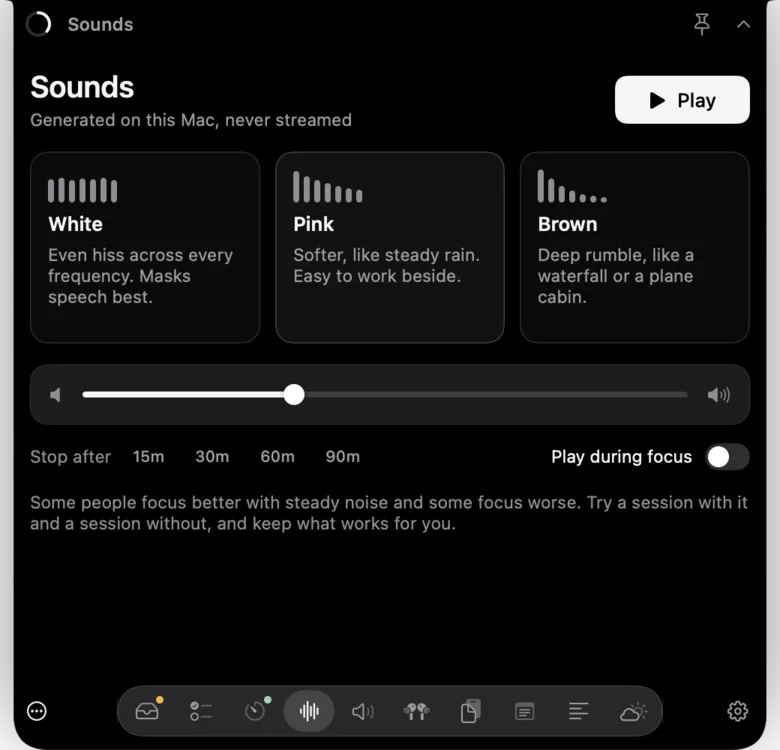
Notchbird's Sounds section plays white, pink or brown noise generated on your Mac, so nothing streams and nothing needs downloading. Pick a colour and a volume, and set it to stop after 15, 30, 60 or 90 minutes. Turn on Play during focus and the noise starts and stops with your Pomodoro sessions. The audio engine only exists while noise is playing, so it costs nothing when it's off.
Which to use
| Background Sounds | A noise app or website | Notchbird Sounds | |
|---|---|---|---|
| Cost | Built in | Free to a few dollars | Part of Notchbird, from $24 a year |
| White, pink and brown by name | No, its own noise presets | Usually | Yes |
| Nature sounds | Yes | Often | No |
| Timer | Yes, from macOS Tahoe 26 | Varies | 15 to 90 minutes |
| Starts with a focus session | No | Rarely | Yes |
If all you want is a steady sound, Background Sounds is enough. Notchbird makes sense if you also want the rest of what lives in the notch. More options are in the guides.
Sources
- Apple: play background sounds on Mac
- Apple: use background sounds on your Apple devices
- Nigg et al. (2024), white or pink noise and youth with ADHD
- Söderlund, Sikström & Smart (2007), listen to the noise
Common questions
Does a Mac have a built-in white noise generator?
Yes. Background Sounds is in System Settings, under Accessibility, then Audio. It plays noise and nature sounds such as rain and ocean, and you can add a Hearing control to the menu bar.
Is brown noise better for focus than white noise?
There is no research either way. Studies of white and pink noise found a small benefit for young people with attention problems and a small cost for others, so test it on yourself.
Can I set white noise to turn off by itself on a Mac?
Yes. macOS Tahoe 26 added a timer to Background Sounds, and Notchbird's Sounds section can stop after 15, 30, 60 or 90 minutes or follow your focus sessions.
Notchbird plays white, pink or brown noise from the notch and can start it with every focus session.
Try Notchbird free