Guide
A Pomodoro timer you can see without switching apps
The simplest Pomodoro timer on a Mac is the built-in Clock app: open Clock, choose Timers, set 25 minutes and click Start. Its weakness is that the countdown hides behind your work. A notch timer keeps the time visible at the top of the screen, which is the part that helps you notice where the session has got to.
Option 1: the Clock app
Recent versions of macOS include Clock. Open it, click Timers (or choose View → Timers), set the length and click Start. You can name a timer and pick its sound, and a timer keeps running if you switch apps or the Mac sleeps. On macOS Sonoma 14.2 and later you can run more than one, so a 25-minute focus timer and a 5-minute break timer can sit side by side.
Siri works too: "Set a focus timer for 25 minutes". The limit is that neither shows the countdown while you work, so you only find out where you are when it rings.
Option 2: a timer in the notch
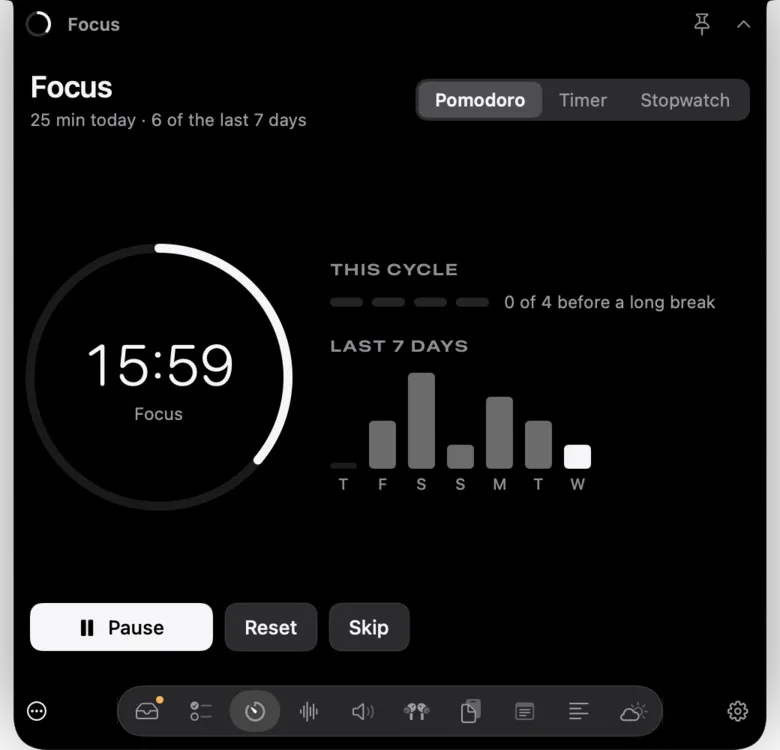
The notch sits in the middle of the menu bar, in your peripheral vision, and nothing else uses it. A notch timer puts the remaining minutes there. In Notchbird's Focus section you choose Pomodoro, a countdown or a stopwatch. Pomodoro runs 25 minutes of focus and 5-minute breaks with a longer break after a set, and you can change all three lengths in Settings. The countdown has one-tap presets from 1 to 60 minutes.
While a session runs, the time shows beside the notch and the status ring fills as it goes. A chart beside the timer shows your focus minutes for the last seven days, without a streak that resets to zero when you miss a day. If you like noise while you work, the Sounds section can start with each focus session.
Do fixed 25-minute breaks help?
Less than the method's fame suggests. Three studies compared fixed Pomodoro breaks with breaks people chose themselves and found no difference in how much work got done. In the largest, self-chosen breaks left people in a slightly better mood (Biwer et al. 2023; Smits, Wenzel & de Bruin 2025; Göksu, Wiradhany & de Bruin 2026). Short breaks in general do reduce fatigue and lift energy, according to a 2022 meta-analysis of micro-breaks, though they made no significant difference to performance (Albulescu et al. 2022).
What a timer reliably gives you is a start. Committing to 25 minutes on one task is a small enough promise to keep, and attention drifts the longer you stay on a task, so a scheduled check-in is useful (Zanesco, Denkova & Jha 2025). Treat 25 and 5 as defaults to adjust. If you are mid-flow when the bell rings, a stopwatch with a break proportional to the work is an equally supported choice.
Which to use
| Option | Countdown visible while you work | Breaks run automatically | Cost |
|---|---|---|---|
| Clock app | No | No, start each timer yourself | Built in |
| Siri | No | No | Built in |
| A phone timer | Only if the phone is face up | Depends on the app | Usually free |
| Notchbird Focus | Yes, beside the notch | Yes, focus, short break and long break | Part of Notchbird, from $24 a year |
Related: decide what the first session is for, or browse the other guides.
Sources
- Apple: set timers in Clock on Mac
- Biwer et al. (2023), Pomodoro breaks and self-regulated breaks
- Smits, Wenzel & de Bruin (2025), self-regulated, Pomodoro and Flowtime breaks
- Göksu, Wiradhany & de Bruin (2026), when to take a break
- Albulescu et al. (2022), micro-breaks meta-analysis
- Zanesco, Denkova & Jha (2025), mind-wandering over time on task
Common questions
Does macOS have a built-in Pomodoro timer?
Not a dedicated one, but the Clock app has timers. Open Clock, click Timers, set 25 minutes and click Start. On macOS Sonoma 14.2 and later you can run several timers at once.
Is 25 minutes the right Pomodoro length?
It is a convention. Studies comparing fixed Pomodoro breaks with breaks people chose themselves found no difference in productivity, so adjust the length to the task.
Can I change the Pomodoro lengths in Notchbird?
Yes. Focus defaults to 25 minutes with 5-minute breaks and a longer break after a set, and you can change all three in Settings. There is also a countdown and a stopwatch.
Notchbird keeps your Pomodoro countdown beside the notch, with your week's focus one hover away.
Try Notchbird free