Guide
The best MacBook notch apps in 2026
For most people the best notch app is Boring Notch or Atoll if you want free, Alcove if you care most about polish and media controls, and DynamicLake if you want the most features and external-display support. NotchNook, the app that started the trend, has been offline since September 2026. Notchbird is the pick if you run AI coding agents or want focus tools in the notch, but it has no music controls.
Quick picks
| Best for | App | Price |
|---|---|---|
| Free, with media and a file shelf | Boring Notch | Free |
| Free and actively developed | Atoll | Free |
| Animation and a native look | Alcove | $14.99 once |
| The most features, external displays | DynamicLake Pro | One-time, on Gumroad |
| Replacing the volume and brightness pop-ups | MediaMate | One-time, on Gumroad |
| Buying through the Mac App Store | NotchNest | Free, Pro $14.99 lifetime |
| The cheapest paid app with a shelf | Droppy | $9.99 once |
| AI coding agents and focus tools | Notchbird | $24/yr or $49 once |
What each one does
| App | Now Playing | File shelf | Volume HUD | Calendar | macOS | Notes |
|---|---|---|---|---|---|---|
| Boring Notch | Yes, with visualiser | Yes, with AirDrop | Yes | Yes | 14+ | Not notarised; last stable release November 2025 |
| Atoll | Yes | Yes | Not stated | Yes | 14+ | Clipboard, timers, system stats, lock-screen widgets |
| Alcove | Yes | Not advertised | Yes | Yes, with live activities | 15+ | Praised for animation |
| DynamicLake Pro | Yes | Yes | Yes | Yes, with meeting join | 14+ | Pill mode for external and non-notch displays |
| MediaMate | Yes | No | Yes, its core feature | No | 13+ | Lightweight, does one job |
| NotchNest | Yes | Yes, 2 files on the free tier | No | Yes | 14+ | Pomodoro and clipboard |
| Droppy | Yes | Yes | Yes | Yes | 14+ | Many add-ons; GitHub repo blocked after a DMCA notice |
| Notchbird | No | Yes, ⌥ to AirDrop | No | No | 14+ | Agent alerts, focus timers, noise, teleprompter, AirPods |
What happened to NotchNook
NotchNook's website and licence server went offline in September 2026, Setapp dropped it and Homebrew disabled its install. Its maker, lo.cafe, says it hopes to restore access, that NotchNook will probably go open source, and that a successor called NOOTCH will give lifetime owners 90% off. Until that ships, we don't recommend buying it. Our NotchNook alternative page has the details.
The apps
Boring Notch
The most popular free notch app, with nearly 11,000 GitHub stars. It covers music with a visualiser, calendar, a file shelf with AirDrop, volume and brightness HUDs and a camera mirror. Two caveats: it isn't notarised, so you have to clear macOS's quarantine flag before it opens, and the last stable release was 2.7.3 in November 2025. A 2.8 release candidate from September 2026 targets high CPU use. See Boring Notch alternatives.
Atoll
Free and open source like Boring Notch, with clipboard history, timers, a colour picker, system stats and lock-screen widgets on top of media and a shelf. It is under active development, with commits this week and beta builds through an update feed.
Alcove
Alcove is what reviewers point to when they say a notch app looks native. MacStories called it "an excellent notch utility with beautiful animations". It costs $14.99 once and needs macOS 15. It handles media, volume and brightness HUDs and calendar live activities, but its site doesn't advertise a file shelf. See Alcove alternatives.
DynamicLake Pro
The widest feature set of the paid apps, with meeting join alerts, file tools, plugins and a pill mode for external displays and Macs without a notch. Its own site quotes a user praising quick bug fixes, while one AlternativeTo user called it "full of features, but very unstable". It's a one-time purchase on Gumroad, and the price isn't shown on its home page.
MediaMate
MediaMate replaces the volume, brightness and keyboard-backlight pop-ups and shows Now Playing, and does little else. MacStories described it as "set up once and then forget". It runs on macOS 13 and later.
NotchNest
A Mac App Store app that is free to start, with Pro at $14.99 lifetime, $2.99 a month or $14.99 a year. It includes media, a shelf, a Pomodoro timer, clipboard history and calendar briefings. Buying through the App Store means Apple handles payment and updates.
Droppy
The cheapest paid option at $9.99 once for two Macs, with a three-day trial. It has a long list of add-ons, including a shelf, clipboard, HUDs, lock-screen widgets and an agents panel that shows Claude and Codex plan limits without approvals. Its GitHub repository has been blocked since February 2026 after Atoll's author filed a DMCA notice alleging copied code; that is an allegation, not a finding.
Notchbird
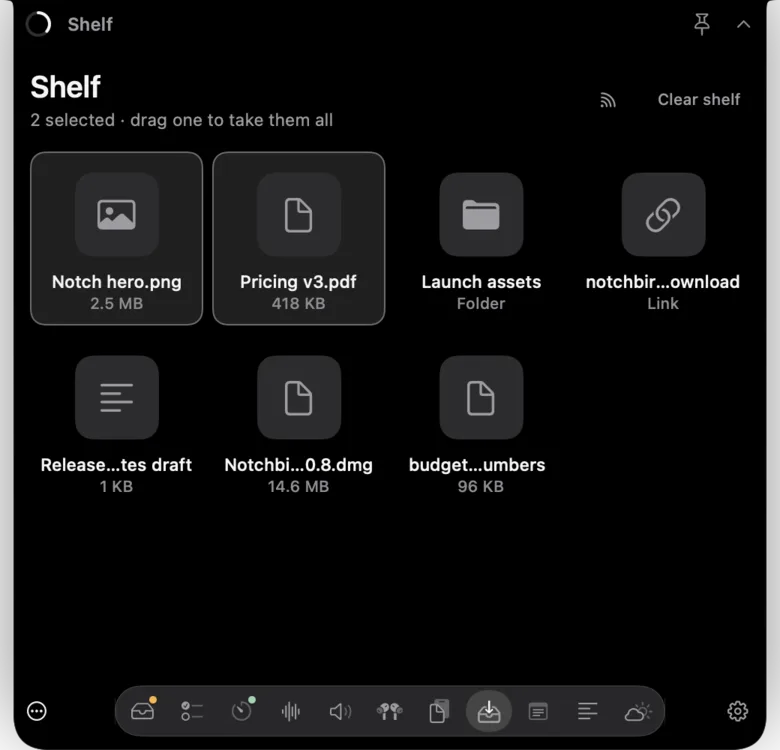
Notchbird is built for people who work at their Mac all day. It alerts you when Claude Code or Codex finishes or needs you, lets you answer Claude Code prompts from the notch, and fills the rest with focus tools: a spoken morning plan, Pomodoro timers, white, pink and brown noise, audio switching with a mute-everywhere button, AirPods battery, clipboard history, a file shelf, Apple Notes capture, a teleprompter under the camera and weather. It is hidden from screen sharing by default and publishes its performance budgets: 0.05% CPU at rest and 64 MB of memory.
If you're coming from NotchNook, Notchbird lacks four things you may miss: music controls in the notch, a calendar, a volume and brightness HUD replacement, and lock-screen widgets. If those are why you want a notch app, Boring Notch, Atoll or Alcove will suit you better.
How to choose
- Music first? Alcove for looks, Boring Notch or Atoll for free.
- External monitor? DynamicLake handles displays without a notch best of this group.
- Only want nicer volume pop-ups? MediaMate.
- Worried about a licence server disappearing? Open-source apps can't lock you out. Among paid apps, look for an offline grace period and a shutdown promise; Notchbird has both, explained on its trust page.
- Run AI coding agents? See the best notch apps for Claude Code and Codex.
Sources
- Boring Notch on GitHub
- Atoll on GitHub
- Alcove
- MacStories: Alcove review
- MacStories: NotchNook and MediaMate
- DynamicLake
- AlternativeTo: Boring Notch reviews
- MediaMate
- NotchNest on the Mac App Store
- Droppy
- GitHub DMCA notice concerning Droppy, February 2026
- lo.cafe statement on NotchNook
Common questions
What is the best free notch app for Mac?
Boring Notch and Atoll are the leading free, open-source notch apps. Boring Notch is the most popular but is not notarised; Atoll is under more active development.
Is NotchNook still available?
No. NotchNook's website and licence server went offline in September 2026. Its maker says it hopes to restore access and plans a successor called NOOTCH.
Does Notchbird have music controls in the notch?
No. Notchbird has no Now Playing controls, calendar, volume HUD replacement or lock-screen widgets. It focuses on AI agent alerts and focus tools.
Want agent alerts and focus tools in your notch? Try Notchbird free for 14 days.
Try Notchbird free