Guide
Alcove alternatives
Alcove is the best-looking notch app, but it needs macOS 15 and its site doesn't advertise a file shelf. On macOS 14 Sonoma, or if you want more tools, try Boring Notch or Atoll for free, DynamicLake for the most features, or Notchbird for focus tools and AI agent alerts.
Where Alcove falls short for some people
- macOS 15 or later. Macs still on Sonoma can't run the current version.
- No file shelf on its feature list. The shelf is the feature reviewers cite most often for notch apps, and Boring Notch, Atoll, DynamicLake, NotchNest, Droppy and Notchbird all have one.
- Few features for the price, for some. One AlternativeTo reviewer called it "still very few features for the money", while others praise it as the most native-looking.
- Update gaps. Alcove is made by one developer, and its rating dipped during a quiet spell before recovering when updates resumed.
Options by what you want
| You want | Try | Price | macOS |
|---|---|---|---|
| Alcove's jobs, free | Boring Notch or Atoll | Free | 14+ |
| Everything, plus external displays | DynamicLake Pro | One-time | 14+ |
| The App Store, with a free tier | NotchNest | Free; Pro $14.99 lifetime | 14+ |
| A cheap all-rounder | Droppy | $9.99 once | 14+ |
| Focus tools and AI agent alerts | Notchbird | $24/yr or $49 once | 14+ |
If media is the part of Alcove you'd miss, Boring Notch and Atoll both show Now Playing with album art and a visualiser, and DynamicLake works with most music apps, Tidal, Podcasts and browsers. Those three come closest to Alcove's everyday feel, even if none matches its animation.
What Notchbird offers instead
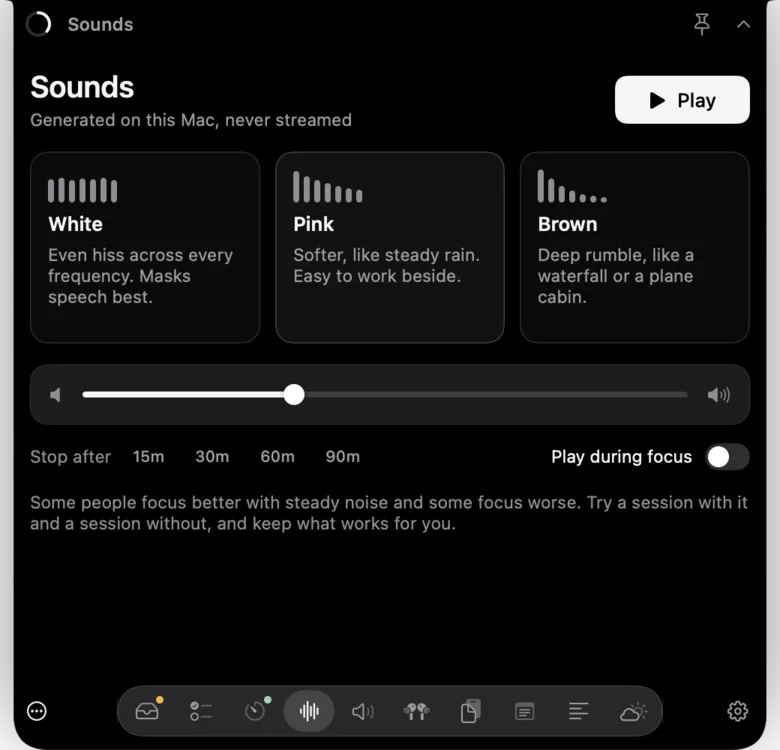
Notchbird runs on macOS 14 and has the file shelf Alcove lacks, with ⌥ to AirDrop. The rest is aimed at getting work done: a spoken morning plan, Pomodoro timers, white, pink and brown noise, a teleprompter under the camera, clipboard history, Apple Notes capture and alerts when Claude Code or Codex needs you. It is hidden from screen sharing by default.
On media, Alcove's strengths are what Notchbird leaves out: Now Playing controls in the notch, volume and brightness HUD replacement, calendar live activities and lock-screen widgets.
Before you switch
- Try the free ones first. Boring Notch and Atoll cost nothing to test, and if music and a shelf are all you need, one of them may be enough.
- Check external displays. Alcove can draw a pill or simulate a notch on screens without one. DynamicLake also has a pill mode. Notchbird falls back to your main screen with a drawn notch, which looks out of place on a monitor without one.
- Check screen-share privacy. Alcove added an opt-in setting to hide from screen sharing in version 1.2.2. Notchbird hides by default. Boring Notch has a screenshot privacy option.
- Use the trial properly. Notch apps earn their place through habit, so use one for a full working week. Notchbird's trial is 14 days with no card, Droppy's is three days, and NotchNest has a free tier.
Stay with Alcove if
Animation and media are why you want a notch app, you're on macOS 15 or later, and you like paying once. Nothing on this list looks better. For the full field, see the best MacBook notch apps.
Sources
- Alcove
- Alcove changelog
- AlternativeTo: Alcove reviews
- AlternativeTo: Boring Notch reviews
- MacStories: Alcove review
- Boring Notch on GitHub
- Atoll on GitHub
- DynamicLake
- NotchNest on the Mac App Store
- Droppy
Common questions
Does Alcove work on macOS 14 Sonoma?
The current version of Alcove requires macOS 15 or later. Boring Notch, Atoll, DynamicLake, NotchNest, Droppy and Notchbird run on macOS 14.
Does Alcove have a file shelf?
Alcove's site does not list a file shelf as of 7 October 2026. Boring Notch, Atoll, DynamicLake, NotchNest, Droppy and Notchbird all have one.
How much does Alcove cost?
Alcove is a one-time purchase of $14.99.
On macOS 14, or want a shelf and focus tools? Try Notchbird free for 14 days.
Try Notchbird free