Guide
How to check your AirPods battery on a Mac
To check AirPods battery on a Mac, connect them, click Control Center in the menu bar, click Sound, and look at your AirPods in the list. The Bluetooth menu in the menu bar shows the level too. To see the case, open the lid or take the AirPods out, and hold them close to the Mac.
Control Center
- Open the lid of the case, or take your AirPods out.
- Hold them close to your Mac.
- Click Control Center in the menu bar, then click Sound.
- Choose your AirPods from the list to see the battery level.
These are Apple's own steps, from its support article on AirPods battery.
The Bluetooth menu
If the Bluetooth icon isn't in your menu bar, go to System Settings → Menu Bar and turn on Bluetooth under Menu Bar Controls. Click the icon while your AirPods are connected and the battery shows next to their name. This is one click shorter than Control Center, which matters if you check often.
If the battery doesn't show
- Reconnect. Put both AirPods in the case, close the lid for a few seconds, then open it near the Mac.
- Charge the case for a few minutes if it has been sitting flat, then try again.
- Check which device they're connected to. AirPods switch between your devices automatically, and the Mac only shows the level while it's the one connected.
- Remove and pair again in System Settings → Bluetooth if they still won't report.
Keep the levels in view
Both built-in methods take two or three clicks, and neither warns you before a call. Two kinds of app help.
Menu bar battery apps show headphone battery as an icon or a percentage. They're good if your menu bar has room.
Notch apps use the space around the camera instead.
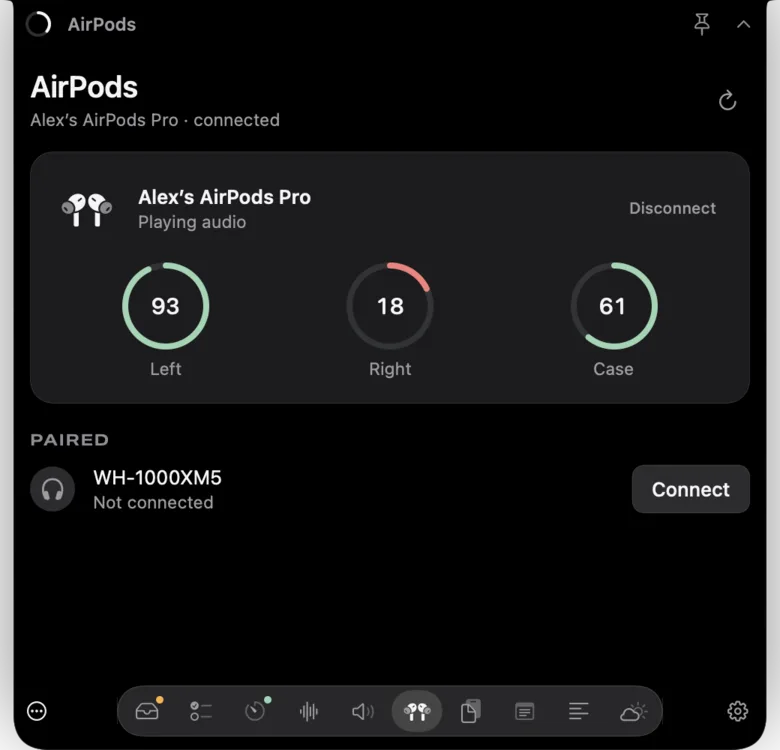
Notchbird's AirPods section shows left, right and case separately, with any bud at 20% or below drawn in red. When your AirPods connect, the notch shows their battery for a moment, so you see a low earbud before the call starts. Paired headphones that aren't connected get a one-click Connect button, and connected ones can be made the audio output. If you want to switch output and input or mute the mic everywhere, the Audio section sits next to it.
macOS only exposes per-bud battery through System Information, so Notchbird reads it when the section opens, once a minute while it stays open, and when an audio device connects. Nothing runs in the background when the section is closed.
Before a call
Battery is half of it. The other half is making sure the Mac is using your AirPods for both sound and microphone.
- Check the level, and put the low bud in the case for a few minutes if you have time. You can take a call on one AirPod.
- Open System Settings → Sound and check that your AirPods are selected under Output and under Input.
- Join the call and check the meeting app's own audio settings, since Zoom and Meet can pick a different microphone from the system.
Notchbird's Audio section puts output and input in one list with a button that mutes your microphone in every app, so steps 2 and 3 are one hover away.
Which to use
| Method | Clicks | Left, right and case | Warns when low |
|---|---|---|---|
| Control Center | 3 | Shows the AirPods level | No |
| Bluetooth menu | 1 | Shows the AirPods level | No |
| Notchbird | Hover | Each one separately | Shows battery on connect, red at 20% |
More Mac fixes are in the guides, including keeping notifications out of a screen share.
Sources
Common questions
Where do I see AirPods battery on a Mac?
Click Control Center in the menu bar, click Sound, and choose your AirPods. The Bluetooth menu in the menu bar also shows the level while they are connected.
Why doesn't my Mac show the AirPods case battery?
Apple's steps are to open the lid or take the AirPods out, hold them close to the Mac, then check Control Center. If the case still doesn't appear, close the lid for a few seconds and open it again beside the Mac.
Can I see each AirPod's battery separately on a Mac?
Notchbird's AirPods section shows left, right and case separately and marks any bud at 20% or below in red.
Notchbird shows left, right and case battery in the notch, and flashes it when your AirPods connect.
Try Notchbird free